名称
复合实体模式
含义
复合视图模式的目的是,增加网站和web应用创建视图时的可复用性和灵活性。 此模式试图将页面的内容与其布局分离开来,允许对页面的内容或布局进行更改而不影响另一方。 此模式还允许内容在不同视图之间轻松重用。
解释
真实世界例子
新闻站点希望根据用户的偏好向不同的用户显示当前的日期和新闻。 新闻网站将根据用户的兴趣使用不同的新闻提要组件, 组件默认为本地新闻。
通俗的说
符合视图模式视一个由较小的子视图组成的主视图。 这个组合视图的布局是基于一个模板。 然后,视图管理器决定在模板中包含了哪些子视图。
维基百科说
复合视图由多个原子视图组成。 模板的每个组件都可以动态地包含到整体中,页面的布局可以独立于内容进行管理。 该解决方案提供了基于动态模块和静态模板片段的包含和替换来创建复合视图。 通过鼓励模块化设计,它促进了视图原子部分的重用。
程序示例
这是一个web开发模式,所以需要一个服务器来演示它。 这个示例使用Tomcat10.0.13来运行servlet,而这个编程实例将只使用Tomcat10+。
首先是AppServlet ,它是一个在Tomcat 10+上运行的 HttpServlet 。
public class AppServlet extends HttpServlet {
  private String msgPartOne = "<h1>This Server Doesn't Support";
  private String msgPartTwo = "Requests</h1>\n"
      + "<h2>Use a GET request with boolean values for the following parameters<h2>\n"
      + "<h3>'name'</h3>\n<h3>'bus'</h3>\n<h3>'sports'</h3>\n<h3>'sci'</h3>\n<h3>'world'</h3>";

  private String destination = "newsDisplay.jsp";

  public AppServlet() {

  }

  @Override
  public void doGet(HttpServletRequest req, HttpServletResponse resp)
          throws ServletException, IOException {
    RequestDispatcher requestDispatcher = req.getRequestDispatcher(destination);
    ClientPropertiesBean reqParams = new ClientPropertiesBean(req);
    req.setAttribute("properties", reqParams);
    requestDispatcher.forward(req, resp);
  }

  @Override
  public void doPost(HttpServletRequest req, HttpServletResponse resp)
          throws ServletException, IOException {
    resp.setContentType("text/html");
    PrintWriter out = resp.getWriter();
    out.println(msgPartOne + " Post " + msgPartTwo);

  }

  @Override
  public void doDelete(HttpServletRequest req, HttpServletResponse resp)
          throws ServletException, IOException {
    resp.setContentType("text/html");
    PrintWriter out = resp.getWriter();
    out.println(msgPartOne + " Delete " + msgPartTwo);

  }

  @Override
  public void doPut(HttpServletRequest req, HttpServletResponse resp)
          throws ServletException, IOException {
    resp.setContentType("text/html");
    PrintWriter out = resp.getWriter();
    out.println(msgPartOne + " Put " + msgPartTwo);

  }
}
这个servlet不是模式的一部分,只是将GET请求转发到正确的JSP。 不支持PUT、POST和DELETE请求,只会显示一条错误消息。
本例中的视图管理是通过javabean类完成的:ClientPropertiesBean用来存储用户偏好。
public class ClientPropertiesBean implements Serializable {

  private static final String WORLD_PARAM = "world";
  private static final String SCIENCE_PARAM = "sci";
  private static final String SPORTS_PARAM = "sport";
  private static final String BUSINESS_PARAM = "bus";
  private static final String NAME_PARAM = "name";

  private static final String DEFAULT_NAME = "DEFAULT_NAME";
  private boolean worldNewsInterest;
  private boolean sportsInterest;
  private boolean businessInterest;
  private boolean scienceNewsInterest;
  private String name;

  public ClientPropertiesBean() {
    worldNewsInterest = true;
    sportsInterest = true;
    businessInterest = true;
    scienceNewsInterest = true;
    name = DEFAULT_NAME;

  }

  public ClientPropertiesBean(HttpServletRequest req) {
    worldNewsInterest = Boolean.parseBoolean(req.getParameter(WORLD_PARAM));
    sportsInterest = Boolean.parseBoolean(req.getParameter(SPORTS_PARAM));
    businessInterest = Boolean.parseBoolean(req.getParameter(BUSINESS_PARAM));
    scienceNewsInterest = Boolean.parseBoolean(req.getParameter(SCIENCE_PARAM));
    String tempName = req.getParameter(NAME_PARAM);
    if (tempName == null || tempName == "") {
      tempName = DEFAULT_NAME;
    }
    name = tempName;
  }
  // getters and setters generated by Lombok
}
这个javabean有一个默认构造函数,还有一个接受 HttpServletRequest的构造函数。 第二个构造函数获取请求对象,解析出包含用户对不同类型新闻偏好的请求参数。
新闻页面的模板在 newsDisplay.jsp中
<html>
<head>
    <style>
        h1 { text-align: center;}
        h2 { text-align: center;}
        h3 { text-align: center;}
        .centerTable {
            margin-left: auto;
            margin-right: auto;
        }
        table {border: 1px solid black;}
        tr {text-align: center;}
        td {text-align: center;}
    </style>
</head>
<body>
    <%ClientPropertiesBean propertiesBean = (ClientPropertiesBean) request.getAttribute("properties");%>
    <h1>Welcome <%= propertiesBean.getName()%></h1>
    <jsp:include page="header.jsp"></jsp:include>
    <table class="centerTable">

        <tr>
            <td></td>
            <% if(propertiesBean.isWorldNewsInterest()) { %>
                <td><%@include file="worldNews.jsp"%></td>
            <% } else { %>
                <td><%@include file="localNews.jsp"%></td>
            <% } %>
            <td></td>
        </tr>
        <tr>
            <% if(propertiesBean.isBusinessInterest()) { %>
                <td><%@include file="businessNews.jsp"%></td>
            <% } else { %>
                <td><%@include file="localNews.jsp"%></td>
            <% } %>
            <td></td>
            <% if(propertiesBean.isSportsInterest()) { %>
                <td><%@include file="sportsNews.jsp"%></td>
            <% } else { %>
                <td><%@include file="localNews.jsp"%></td>
            <% } %>
        </tr>
        <tr>
            <td></td>
            <% if(propertiesBean.isScienceNewsInterest()) { %>
                <td><%@include file="scienceNews.jsp"%></td>
            <% } else { %>
                <td><%@include file="localNews.jsp"%></td>
            <% } %>
            <td></td>
        </tr>
    </table>
</body>
</html>
个JSP页面就是模板。它声明了一个有三行的表,第一行有一个组件,第二行有两个组件,第三行有一个组件。
文件中的标签(if-else)是视图管理策略的一部分,该策略根据用户在Javabean中的偏好,选择包含不同的原子子视图。
下面是组合中使用的模拟原子子视图的两个示例: businessNews.jsp
<html>
    <head>
        <style>
            h2 { text-align: center;}
            table {border: 1px solid black;}
            tr {text-align: center;}
            td {text-align: center;}
        </style>
    </head>
    <body>
        <h2>
            Generic Business News
        </h2>
        <table style="margin-right: auto; margin-left: auto">
            <tr>
                <td>Stock prices up across the world</td>
                <td>New tech companies to invest in</td>
            </tr>
            <tr>
                <td>Industry leaders unveil new project</td>
                <td>Price fluctuations and what they mean</td>
            </tr>
        </table>
    </body>
</html>
localNews.jsp
<html>
    <body>
        <div style="text-align: center">
            <h3>
                Generic Local News
            </h3>
            <ul style="list-style-type: none">
                <li>
                    Mayoral elections coming up in 2 weeks
                </li>
                <li>
                    New parking meter rates downtown coming tomorrow
                </li>
                <li>
                    Park renovations to finish by the next year
                </li>
                <li>
                    Annual marathon sign ups available online
                </li>
            </ul>
        </div>
    </body>
</html>会根据请求参数有条件地包括不同的子视图,例如worldNews.jsp, businessNews.jsp等。
如何使用
要尝试此示例,请确保已安装Tomcat 10+。 设置IDE以从module构建WAR文件,并将该文件部署到服务器。
IntelliJ:
在run和edit configurations中,确保Tomcat服务器是运行配置之一。 转到deployment界面,确保有一个名为composite-view:war exploded的工件正在生成。 如果不存在,则添加一个。
确保工件是根据web目录的内容和module的编译结果构建的。 将工件的输出到一个方便的地方。运行配置并查看登录页, 按照该页上的说明继续操作。
类图
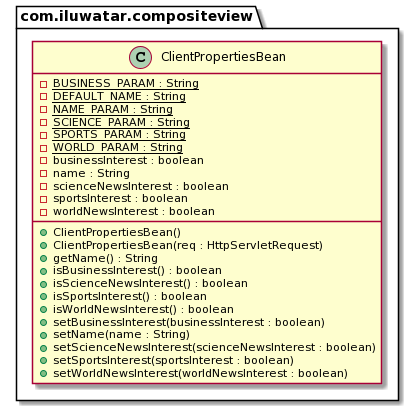
这里的类图显示了视图管理器Javabean。 这些视图是保存在web目录中的JSP。
适用性
这种模式适用于大多数要求动态/有条件显示内容的网站。 如果有组件需要在多个视图中重复使用,或者如果项目需要重用模板, 或者如果它需要根据特定条件包含内容,那么这种模式是一个不错的选择。
已知使用
大多数现代网站使用某种形状或形式的复合视图,因为它们有视图模板和动态包含在页面中的小原子组件。 大多数现代Javascript库,比如React,都支持这种带有组件的设计模式。
后果
优点
- 易于重复使用的组件
- 在不影响其他的情况下更改布局/内容
- 减少代码重复
- 代码更易于维护和模块化
缺点
- 运行时有间接能耗
- 与直接嵌入元素相比,响应较慢
- 增加显示错误的可能性